Description:
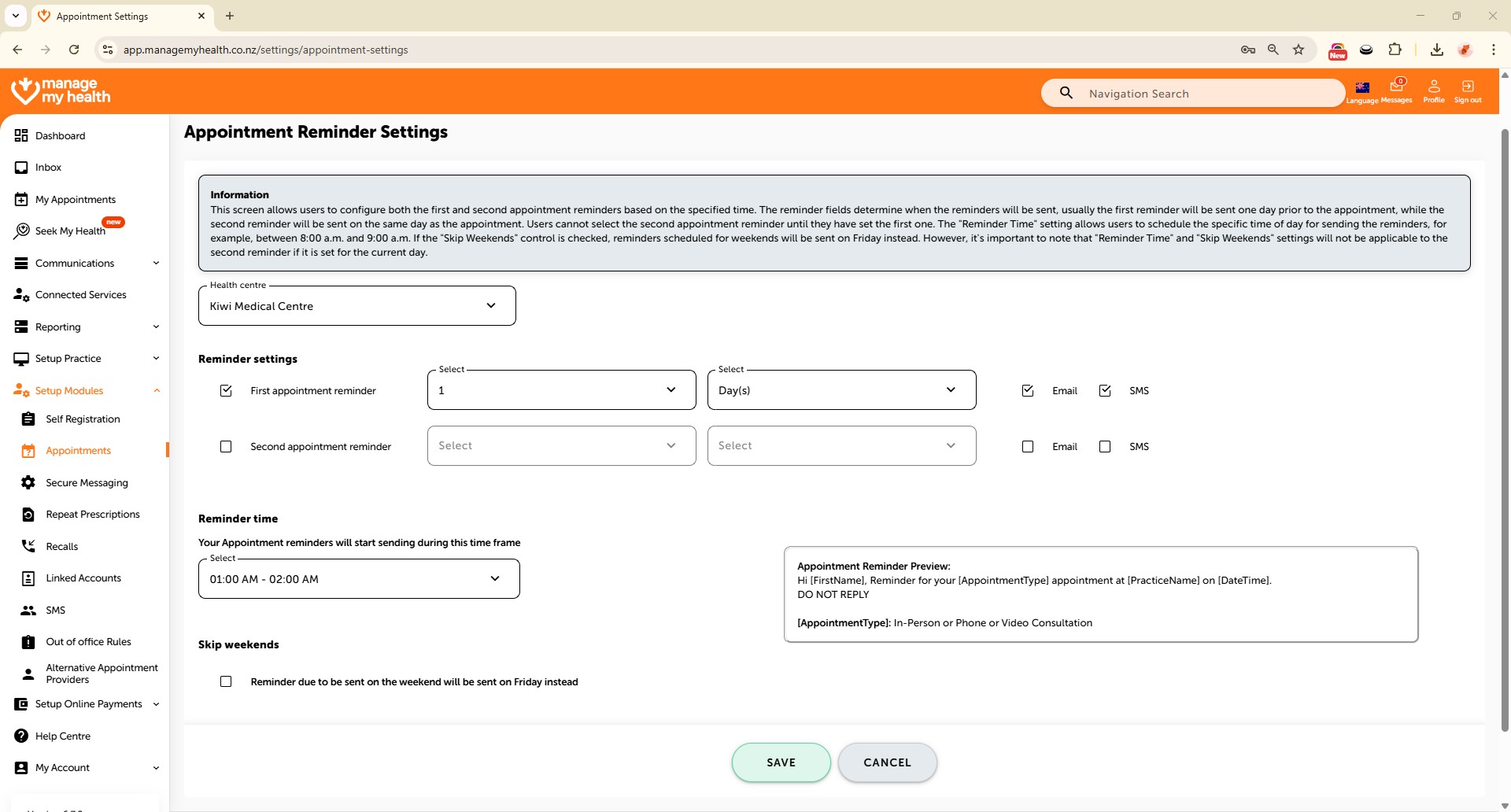
This help guide explains how to set up appointment reminder settings in ManageMyHealth. It’s useful when you want to control how and when patients receive reminders by email or SMS. You’ll learn how to enable first and second reminders, choose delivery times, and configure weekend notifications. By following these steps, you can preview reminder messages and ensure patients receive timely notifications to reduce missed appointments.
Video Demo:
Steps:
- From the left sidebar, select Setup Modules.
- In the navigation menu, click on Appointments.
- Use the arrow icon to expand additional settings tabs related to appointments.
- Select the “Appointment Reminder Settings” tab to manage how reminders are sent to patients.
- Click “Edit” to update the reminder settings.
- Enable the first and second appointment reminders and select the preferred days and times for sending them via email and SMS.
- Open the “Reminder Time” dropdown to set the time window for sending reminders.
- Choose the desired time range (e.g., 06:00 PM – 07:00 PM) during which reminders will be delivered.
- Enable the option to send weekend reminders on Friday, ensuring patients receive notifications in advance.
- Review the Appointment Reminder Preview box to see the message template that patients will receive.
- Click “SAVE” to apply for your change.